
Monitor municipal records that matter to your files
Public records made usable
Watch addresses, file numbers, and keywords across Caledon and Dufferin. Get emailed when relevant agendas, attachments, or reports are posted or updated, with source links and a more organized monitoring workflow.
Monitoring plans also include premium search access for investigating related records beyond your alerts.
What an alert looks like
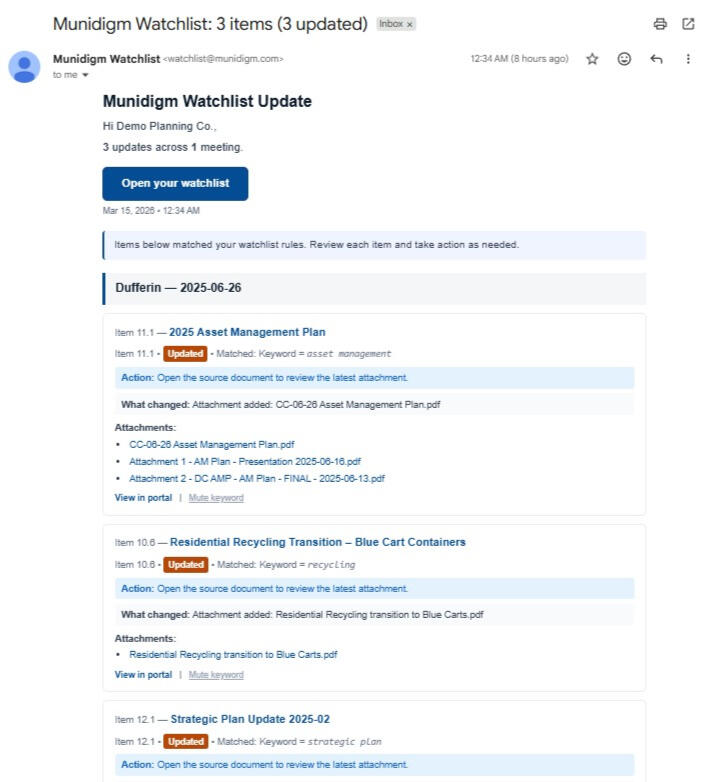
Receive alerts with matched items, change labels, and source links back to the municipal record.
Included with monitoring
Monitoring plans include more than email alerts. You also get portal tools that support repeat monitoring work across your files, projects, and issues.
Watchlist monitoring by address, file number, keyword, project term, or other matter you want tracked
Change detection for relevant agenda items, reports, attachments, addenda, and other posted updates
Source links back to the official municipal record so you can review the original document quickly
Saved searches for repeat monitoring needs that go beyond one-off lookups
Project and matter tracking to organize ongoing files, properties, topics, and client-related issues
Portal search access for investigating related records beyond the alerts themselves
Flexible alert delivery including instant alerts and digest-style review, depending on your setup
Portal access to review and manage monitoring activity in one place
Who this is for
Planning and development teams tracking files across municipalities
Lawyers and consultants monitoring agenda items, reports, and updates
Engineers and project teams who do not want to manually check multiple portals
Serious local stakeholders who need more than occasional searching
How The Watchlist Works
Send addresses, file numbers, and keywords you’re tracking
We set up the watchlist and alerts, then monitor meeting materials for changes
You receive email alerts and/or digests with source links, as well as preferences you can manage
See a quick watchlist walkthrough
30-second demo of how alerts and the watchlist portal works

Briefings
Need to understand the file before you start watching it?Monitoring tracks new records and updates. A briefing can explain the existing history of reports, decisions, deferrals and budget records, helping you understand where a file stands before alerts begin or alongside them.See briefing levels
Coverage
Town of Caledon - Council, COA, Planning & Development, General
Dufferin County - Council
Town of Orangeville - Council, COA, Official Plan Steering
Town of Shelburne - Council, Committee of Adjustment
Town of Grand Valley - Council
Township of Amaranth - Council
Town of Mono - Council, Committee of Adjustment
Township of East Garafraxa - Council, Committee of Adjustment
Township of Melancthon* - Coming Soon
Township of Mulmur* - Coming Soon
Reach out to see where your community is in our roadmap
Pricing
All monitoring plans include premium search access for covered records.
Dufferin + lower tiers: $299/mo
Caledon: $399/mo
Dufferin + Caledon: $599/mo
Paid 60-day pilot available at $100 off per month. No setup fee. 3-month minimum commitment after pilot.
What paid access looks like
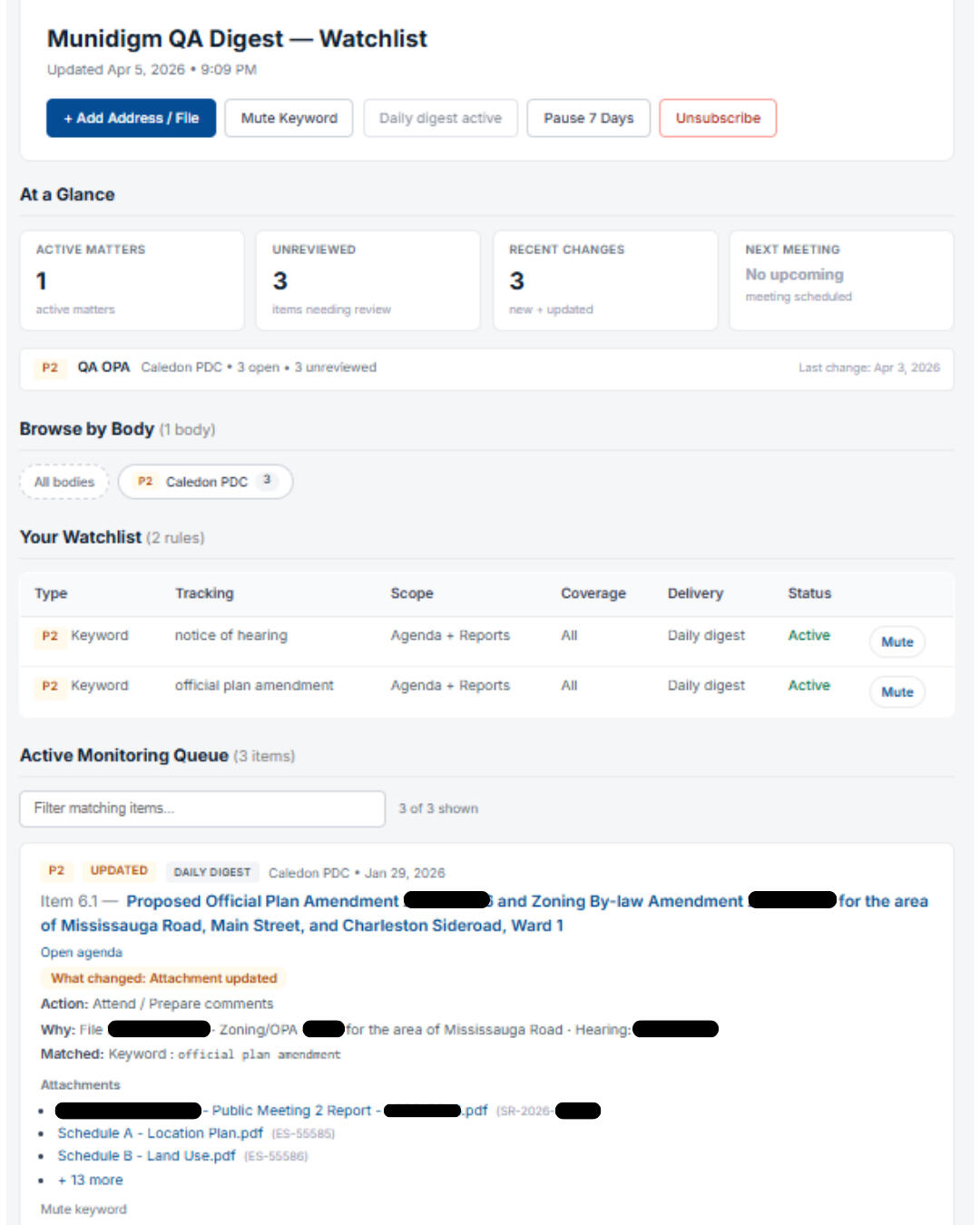
Track active watchlist rules, review matched items, and manage delivery settings from one customer view.
Frequently Asked Questions
1. How is this different from municipal subscription or notice emails?
Municipal emails and notices can be useful, but they are usually municipality-specific and process-specific. Munidigm adds a watchlist layer, so you can track specific addresses, file numbers, and keywords across multiple municipalities, and get alerts when relevant agenda items, reports, or attachments are posted or updated.2. Does this replace municipal planning notices?
No. Municipalities may send statutory or file-specific notices to applicants, commenters, nearby owners, or people who request notice. Munidigm is a monitoring and workflow tool that helps you track relevant agenda items, reports, attachments, and updates across covered municipalities in one place.3. What can I track with the watchlist?
You can track addresses, file numbers, keywords, committee names, project terms, and other phrases relevant to your files or clients.4. What will I get alerts for?
Alerts cover relevant agenda items, reports, attachments, and addenda when they are posted or updated, with source links back to the municipal record.5. Does it detect changes after something is first posted?
Yes. Munidigm can flag new attachments, revised reports, addenda, and other changes after the initial posting.6. How fast are alerts?
Alerts are sent on a polling schedule that varies by source and timing. For active coverage, updates are typically surfaced the same day and often much sooner.7. Do you guarantee every municipal posting will be captured instantly?
Munidigm is designed to make monitoring faster and more consistent than manual checking, but municipal source systems can change, repost, or delay materials without notice. For critical deadlines or filings, clients should confirm against the official source record.8. Can I choose instant alerts or digest?
Yes. You can receive alerts individually as they happen or switch to a daily digest, depending on how you prefer to review updates.9. Is Munidigm affiliated with any municipality?
No. Munidigm uses publicly available municipal records and is not affiliated with any municipality.10. Does monitoring include search access?
Yes. Monitoring plans include portal tools that support ongoing monitoring work, including saved searches, project or matter tracking, and record search for investigating issues beyond the alerts themselves. These features are meant to complement the watchlist service, not sit separately from it.11. Can monitoring be combined with a briefing?
Yes. A Records Scan can assess whether a meaningful public-record trail exists. A briefing can explain where a file stands, while monitoring tracks subsequent changes. You can request a briefing before monitoring begins or later when an alert raises a question. Scans and briefings are scoped and quoted separately from monitoring plans.Important notice
Munidigm relies on publicly posted municipal agendas, reports, attachments, minutes, and related public materials. Because municipalities may revise, replace, delay, remove, or reformat those materials without notice, Munidigm should be used as a monitoring and workflow support tool rather than the sole basis for legal filings, statutory deadlines, or other professional determinations.
Read our terms of services.
About Munidigm
Munidigm is an independent service that helps users track municipal public records more efficiently across covered municipalities. It is built to make council and committee records easier to monitor, search, and review without piecing updates together across multiple municipal websites.Munidigm is not affiliated with any municipality, council, or government body. It uses public municipal source records and links back to the original documents where available.
Security and privacy
Munidigm is built to support customer access, saved searches, watchlist settings, and alert delivery while limiting unnecessary exposure of account data. Portal access may use customer-specific links, account-linked access, or related authentication controls depending on the service setup.We use reasonable administrative and technical measures to protect account and service information, but no website, email system, or online service can guarantee absolute security. Full details are available in the Privacy Policy.
Contact: [email protected]
Main Site | Search Portal | Briefings | Monitoring | Legal | Contact
Munidigm - Public Records Made Usable
© Munidigm 2026 | All Rights Reserved